
Quickstart
Learn how to access market-level housing data across the US. This guide will help you retrieve your API key, search markets, and start analyzing housing trends using the API.
Get Up and Running
In this guide, you'll learn how to:
- Create your Parcl Labs account and get an API key
- Make your first API call
- Search markets and understand parcl_ids
- Track your API usage
- Start building with real examples
1. Set Up Your API account
Create your Parcl Labs account to get started:
Register for a free account (or sign in if you have one) here
Navigate to the dashboard and copy your API key from API-Resources page
Store your key securely - you'll need it for all API requests
2. Make Your First Request
Let's make your first API call! We'll retrieve the latest housing market activity for Chicago, including sales, new listings, and rental activity. You can copy and paste this cURL command (a widely used command-line tool for making API requests) into your terminal:
curl -X GET "https://api.parcllabs.com/v1/market_metrics/2899845/housing_event_counts?limit=1&offset=0" \
  -H "Accept: application/json" \
  -H "Authorization: {API_KEY}"
- Replace
{API_KEY}with your actual API key
What happens when you run this command:
- The API validates your API key.
- Looks up the latest housing activity for parcl_id
2899845(Chicago). - Returns one month of data (
limit=1) starting from the most recent month (offset=0) for all property types in the selected market. - Displays the results in your terminal.
You'll get back a response like this:
{
  "parcl_id": 2899845,
  "property_type": "ALL_PROPERTIES",
  "items": [
    {
      "date": "2024-11-01",
      "sales": 13236,
      "new_listings_for_sale": 8478,
      "new_rental_listings": 17481,
      "transfers": 21544
    }
  ],
  "total": 71,
  "limit": 1,
  "offset": 0,
  "links": {
    "first": "https://api.parcllabs.com/v1/market_metrics/2899845/housing_event_counts?limit=1&offset=0",
    "last": "https://api.parcllabs.com/v1/market_metrics/2899845/housing_event_counts?limit=1&offset=70",
    "self": "https://api.parcllabs.com/v1/market_metrics/2899845/housing_event_counts?limit=1",
    "next": "https://api.parcllabs.com/v1/market_metrics/2899845/housing_event_counts?limit=1&offset=1",
    "prev": null
  }
}
Understanding the response:
sales: Completed home sales in the marketnew_listings_for_sale: New properties that came on the marketnew_rental_listings: New rental properties availabletransfers: Total ownership transfers (includes non-sale transfers)links: Navigation links for retrieving additional months of datatotal: Total number of datapoints available
3. Search a Market
Following your first request, the next step is to explore the markets available through the Parcl Labs API. The API covers every market in the US at any geographic level, including zip code, city, town, county, and Metropolitan Statistical Area (MSA) levels.
The Search Markets endpoint allows you to retrieve the parcl_id - the unique identifier for each market. This parcl_id is your gateway to the API - you'll need it as a required parameter in most other endpoints to access data about your selected market.
Calls to the search endpoint do not count against your credit limit. We want you to easily find the markets you need to kickstart your analysis without impacting your available credits.
Below, we explore two primary methods for using the search endpoint: by entering a specific text-based query, such as "New York City," or by applying geographic parameters to retrieve all parcl_ids that meet specific location criteria, like all cities within California.
A. Search Using a Query Term
The search query is the most straightforward method to discover markets using the Parcl Labs API. Here’s how you can craft and execute a search query effectively:
- Craft your query: Input a specific name or term associated with the geographic area you are interested in. This could be a city name (or equivalent), a county, or even a zip code.
- Executing the query-based search: Use the following cURL command to perform the search:
curl -X GET "https://api.parcllabs.com/v1/search/markets?query={QUERY}" \
  -H "Accept: application/json" \
  -H "Authorization: {API_KEY}"
- Replace
{API_KEY}with your actual API key - Replace
{QUERY}with your market of interest, ensuring that spaces in the query are URL-encoded (e.g., "New York City" becomes "New%20York%20City")
This command will return results for the query term (e.g., "New York City"), fetching the parcl_id(s) associated with this term.
You'll get back a response like this:
{
  "items": [
    {
      "parcl_id": 2900187,
      "country": "USA",
      "geoid": "35620",
      "state_fips_code": null,
      "name": "New York-Newark-Jersey City, Ny-Nj-Pa",
      "state_abbreviation": null,
      "region": null,
      "location_type": "CBSA",
      "total_population": 19908595,
      "median_income": 93610,
      "parcl_exchange_market": 0,
      "pricefeed_market": 1,
      "case_shiller_10_market": 1,
      "case_shiller_20_market": 1
    },
    {
      "parcl_id": 5372594,
      "country": "USA",
      "geoid": "3651000",
      "state_fips_code": "36",
      "name": "New York City",
      "state_abbreviation": "NY",
      "region": "MIDDLE_ATLANTIC",
      "location_type": "CITY",
      "total_population": 8622467,
      "median_income": 76607,
      "parcl_exchange_market": 1,
      "pricefeed_market": 1,
      "case_shiller_10_market": 0,
      "case_shiller_20_market": 0
    },
    {
      "parcl_id": 5822484,
      "country": "USA",
      "geoid": "36061",
      "state_fips_code": "36",
      "name": "New York County",
      "state_abbreviation": "NY",
      "region": "MIDDLE_ATLANTIC",
      "location_type": "COUNTY",
      "total_population": 1645867,
      "median_income": 99880,
      "parcl_exchange_market": 0,
      "pricefeed_market": 1,
      "case_shiller_10_market": 0,
      "case_shiller_20_market": 0
    },
    {
      "parcl_id": 5307989,
      "country": "USA",
      "geoid": "3479610",
      "state_fips_code": "34",
      "name": "West New York Town",
      "state_abbreviation": "NJ",
      "region": "MIDDLE_ATLANTIC",
      "location_type": "TOWN",
      "total_population": 52438,
      "median_income": 70141,
      "parcl_exchange_market": 0,
      "pricefeed_market": 0,
      "case_shiller_10_market": 0,
      "case_shiller_20_market": 0
    },
    {
      "parcl_id": 5372782,
      "country": "USA",
      "geoid": "3651011",
      "state_fips_code": "36",
      "name": "New York Mills Village",
      "state_abbreviation": "NY",
      "region": "MIDDLE_ATLANTIC",
      "location_type": "VILLAGE",
      "total_population": 3084,
      "median_income": 55000,
      "parcl_exchange_market": 0,
      "pricefeed_market": 0,
      "case_shiller_10_market": 0,
      "case_shiller_20_market": 0
    },
    {
      "parcl_id": 5504094,
      "country": "USA",
      "geoid": "2746060",
      "state_fips_code": "27",
      "name": "New York Mills City",
      "state_abbreviation": "MN",
      "region": "WEST_NORTH_CENTRAL",
      "location_type": "CITY",
      "total_population": 1166,
      "median_income": 46458,
      "parcl_exchange_market": 0,
      "pricefeed_market": 0,
      "case_shiller_10_market": 0,
      "case_shiller_20_market": 0
    }
  ],
  "total": 6,
  "limit": 12,
  "offset": 0,
  "links": {
    "first": "https://api.parcllabs.com/v1/search/markets?query=New+York&offset=0",
    "last": "https://api.parcllabs.com/v1/search/markets?query=New+York&offset=0",
    "self": "https://api.parcllabs.com/v1/search/markets?query=New%20York",
    "next": null,
    "prev": null
  }
}
Each search term may return multiple unique markets, and each unique market has its own distinct parcl_id.
B. Search Using Market Parameters
In addition to basic search term queries, the Parcl Labs API allows you to refine your search using specific geographic parameters. These parameters help narrow down the search results to more closely match your needs:
- Geographic scope:
- You can specify the type of geographic boundary for your search, such as
CITY,COUNTY,ZIP5, orCBSA. This helps in pinpointing the exact level of data granularity you need.
- You can specify the type of geographic boundary for your search, such as
- Regional filtering:
- The API allows filtering by
regionorstate, facilitating searches that are constrained to specific areas of interest. For example, you can focus your search within a particular state or a broader federal region.
- The API allows filtering by
- Executing the parameter-based search: Use the following cURL command to perform the search for markets in a specific state (CA) and location type (CITY):
curl -X GET "https://api.parcllabs.com/v1/search/markets?state_abbreviation=CA&location_type=CITY" \
  -H "Accept: application/json" \
  -H "Authorization: {API_KEY}"
- Replace
{API_KEY}with your actual API key
This command will return results for all cities within the state of California, fetching all the parcl_ids associated with these cities.
Want to explore more search options? Check out our Search Quickstart Notebook for advanced examples and real-world use cases.
C. Using parcl_id To Retrieve Market Metrics
Once you have the parcl_id for a specific market from your search results, you can use this identifier to request metrics about that market directly from the Parcl Labs API.
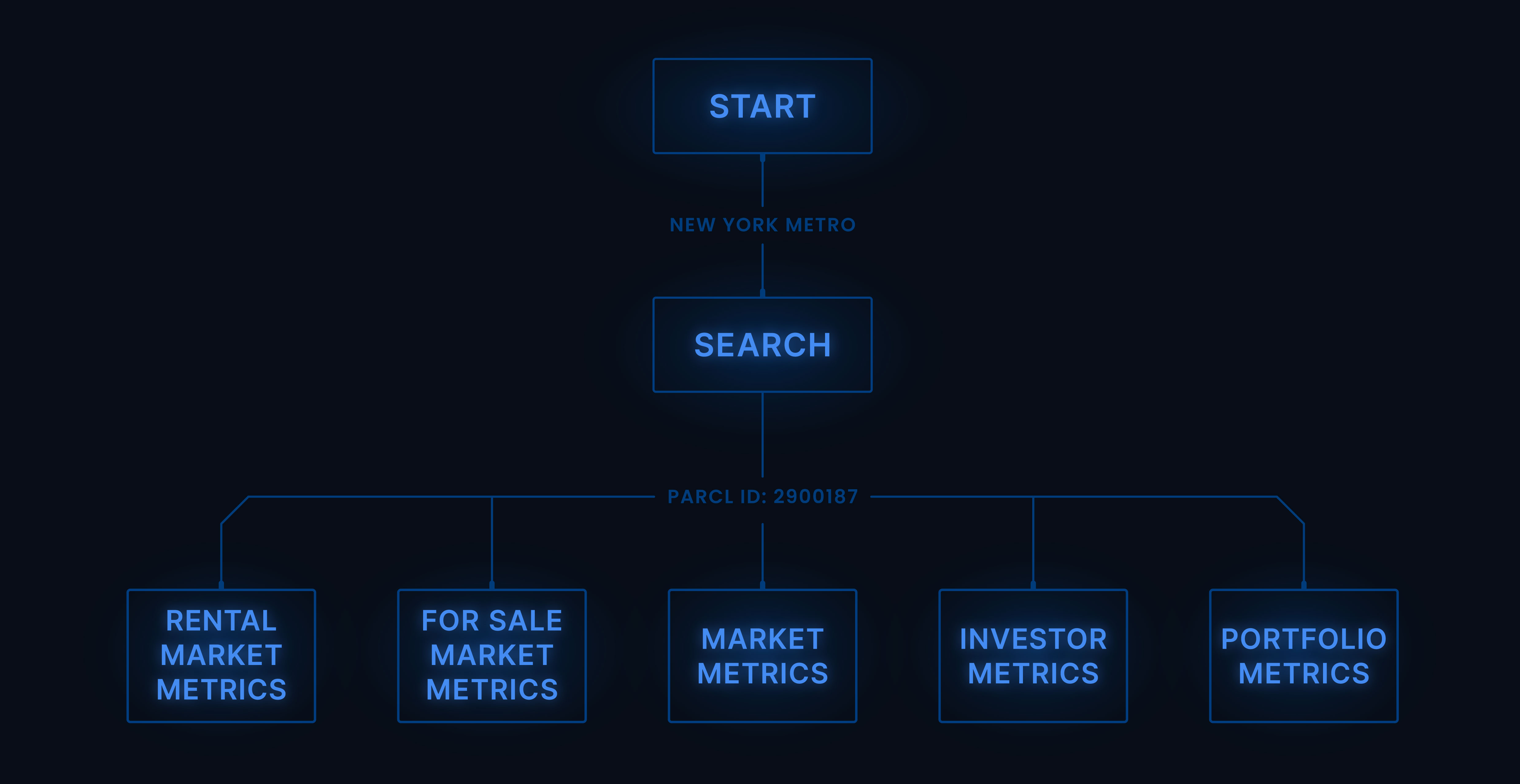
How to Use theparcl_id:
- Insert the
parcl_idinto the API request path: Use theparcl_idas an API path parameter to access specific data endpoints, such as housing stock, market prices, rental yields, or investor metrics.
Example Command to Retrieve Metrics:
To get information about the housing stock for a particular market, you can use the following command:
curl -X GET "https://api.parcllabs.com/v1/market_metrics/{parcl_id}/housing_stock" \
  -H "Accept: application/json" \
  -H "Authorization: {API_KEY}"
- Replace
{API_KEY}with your actual API key - Replace
{parcl_id}with the actualparcl_idobtained from your search
Using the parcl_id, this command retrieves data on the market's housing stock, including counts of single-family homes, condos, and townhouses.
Congrats! You've successfully navigated key functionalities of the API: you've performed market searches to identify parcl_ids and accessed core housing market metrics, such as housing stock and investor purchase-to-sale ratios.
4. Check Your Usage
Keep track of your API usage in real-time by visiting the API-Resources page. Credits are simple: 1 data point = 1 credit.
Here's what you'll find in your dashboard:
- Credits used this cycle
- Remaining credits
- When your credits reset
Learn more about credits, how to manage your usage, and explore upgrade options in our Credits Guide.
5. Start Building
Here are your next steps to continue learning about and building with our API:
- Browse the API Reference: See all available endpoints and features.
- Dive into Property Data: Unlock unit-level data and event histories - start now with our Property API Quickstart.
- Get our Python SDK: Handle data efficiently and scale your analysis.
- Explore the Cookbook: Build from our open-source research notebooks and visualizations.
- Review our Research: Get inspired by our latest housing market analyses.
Need help getting started? Join our developer community or email us at team@parcllabs.com.